
Wavefront field note
AI Agents vs Workflow Automation: What Should Your Business Build First?
Compare AI agents and workflow automation, use a six-question decision scorecard, and scope a measurable first pilot for your business.
By Daniel Michaelis · 2026-08-27

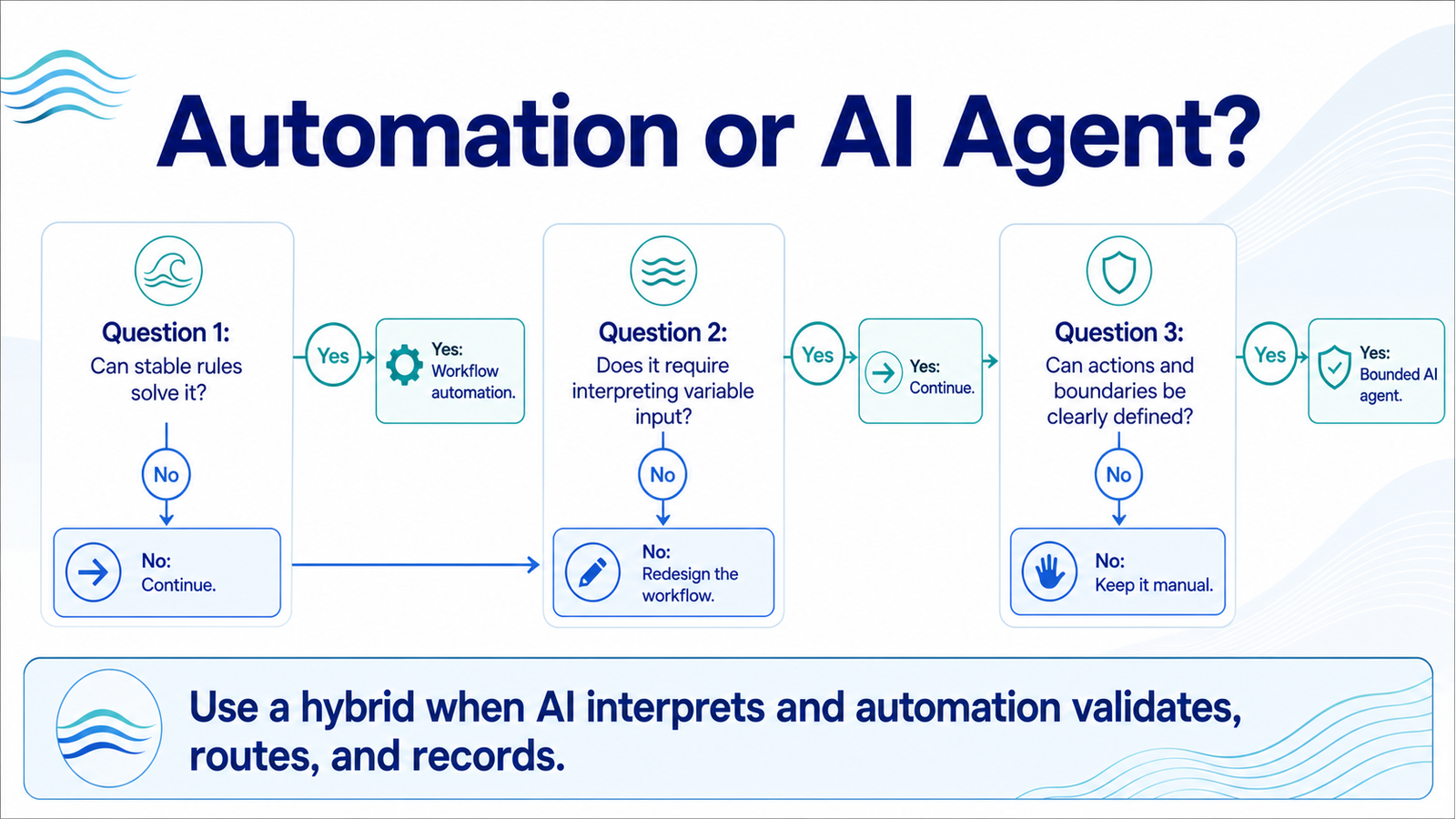
Most businesses should build a conventional workflow automation first. Choose an AI agent only when the task genuinely requires interpreting variable inputs, choosing among multiple permitted actions, and adapting the next step to context. If a fixed set of rules can solve the problem reliably, adding an agent usually adds cost, testing work, and failure modes without adding enough value.
That distinction matters because adoption is moving faster than operational integration. The 2026 OECD D4SME Survey, based on more than 2,000 small and medium-sized businesses across 12 countries, found that most use off-the-shelf AI while targeted, secure integration remains uneven. U.S. Census Bureau data tells a similar story: 57% of businesses using AI applied it in three or fewer business functions.
The opportunity is real, but the first build should prove an outcome, not prove that your company can use the newest label.
Key Takeaways
- Use workflow automation when the decision path can be written as stable rules.
- Use an AI agent when the work requires bounded interpretation and tool choice.
- Score the workflow before choosing the technology.
- Pilot one narrow process with a source of truth, owner, and rollback path.
- Measure business outcomes and exception quality, not demo fluency.
AI agent vs automation at a glance
| Decision factor | Workflow automation | AI agent |
|---|---|---|
| Best for | Stable, repetitive processes | Variable requests within a bounded domain |
| Decision logic | Explicit rules and branches | Model interprets context within policies |
| Typical inputs | Structured fields and known events | Emails, calls, documents, free-form requests |
| Predictability | Higher | Lower, requiring evaluation and guardrails |
| Testing burden | Branch and integration tests | Branch, integration, model, adversarial, and regression tests |
| Human review | Exceptions and approvals | Confidence thresholds, sensitive actions, and exceptions |
| Maintenance | Update rules when the process changes | Update rules, prompts, tools, evaluations, and model behavior |
| Good first metric | Cycle time or manual touches | Resolution quality at an acceptable escalation rate |
The two approaches are not enemies. A strong AI system often uses an agent only for the uncertain part, then hands the result to deterministic automation for validation, routing, logging, and notifications.
When workflow automation is the better first build
Workflow automation wins when the trigger, required data, decision rules, and allowed actions are known in advance. It is the right starting point for tasks such as copying an approved lead into a CRM, sending appointment reminders, routing an invoice by amount, creating a follow-up task, or notifying a manager when a service-level target is missed.
The advantage is not that automation is less sophisticated. It is that the business can explain exactly what should happen. That makes the process easier to test, audit, repair, and transfer to another owner.
Choose workflow automation first when all four statements are true:
- The input arrives in a predictable format.
- The decision can be represented as rules or a small decision tree.
- The same action should follow every time the conditions match.
- Exceptions can be routed to a named person or queue.
For example, a contractor does not need an agent to send a confirmation after a quote request. A form submission can trigger a confirmation, create the CRM record, assign the lead by ZIP code, and alert a salesperson. AI might help summarize a long project description, but the orchestration around it should remain deterministic.
When an AI agent earns the extra complexity
An AI agent earns its place when the workflow cannot be reduced to reliable static rules, yet the domain can still be bounded. The agent may need to interpret an unstructured request, retrieve relevant information, choose a permitted tool, ask a clarifying question, and decide whether to continue or escalate.
Good candidates include triaging a mixed support inbox, qualifying leads whose needs are described differently, extracting information from inconsistent documents, or helping a caller choose among appointment types. Even then, the agent should not receive unlimited authority.
Define its operating envelope before building:
- Allowed intents and actions
- Systems it may read and change
- Required confirmations
- Confidence thresholds
- Prohibited data and decisions
- Immediate escalation triggers
- Maximum attempts before handoff
- Logging, review, and rollback requirements
NIST's Generative AI Profile notes that generative AI may require different levels of human oversight, review, tracking, and management depending on the risk. In practice, that means an agent that recommends a meeting time can have more freedom than one that changes a price, approves a refund, or touches regulated information.
The six-question decision scorecard
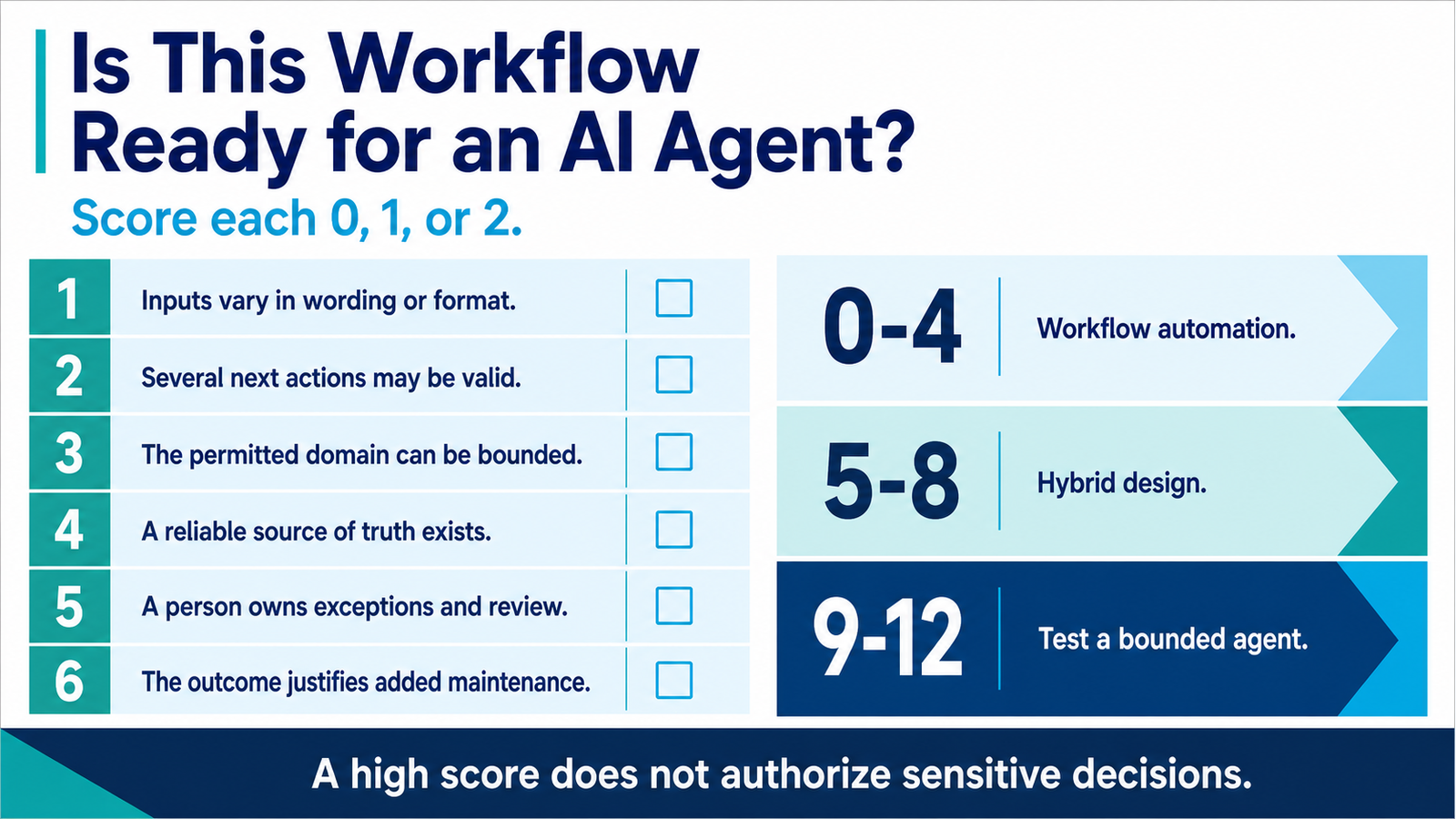
Score the proposed workflow before choosing a platform. Use 0 for no, 1 for partly, and 2 for yes.
| Question | What a high score suggests |
|---|---|
| Do inputs vary in wording, format, or completeness? | AI may help interpret them |
| Must the system choose among several valid next actions? | An agent may add value |
| Can the permitted domain and actions be clearly bounded? | The agent can be controlled |
| Is there a reliable source of truth for facts and status? | The system can ground decisions |
| Can a person own exceptions and review samples? | Operational oversight is possible |
| Is the outcome valuable enough to justify evaluation and maintenance? | Added complexity may pay back |
0 to 4: Start with workflow automation. The problem is probably deterministic or not ready.
5 to 8: Use a hybrid. Keep orchestration rule-based and apply AI to one interpretation step.
9 to 12: Test a bounded agent, provided the failure cost is acceptable and human oversight is defined.
This is a prioritization tool, not a safety certification. A high score does not authorize high-impact decisions. Legal, financial, healthcare, employment, and other sensitive workflows require domain-specific review and controls.
How to run a first pilot that produces evidence
1. Name one operational bottleneck
Do not begin with “we need an AI agent.” Begin with a measurable problem such as slow lead response, repeated manual data entry, unresolved after-hours calls, or invoices waiting for coding. Record a baseline before changing anything.
2. Map the current workflow
Document the trigger, inputs, decisions, systems, owners, exceptions, and completion condition. If the team cannot agree on the current process, automation will reproduce that ambiguity at higher speed.
3. Separate rules from judgment
Mark every step as deterministic, interpretive, or approval-required. Automate deterministic steps normally. Use AI only where interpretation adds value. Keep irreversible, sensitive, or high-cost actions behind confirmation.
4. Build the smallest closed loop
The pilot must end in a real operational system. A lead qualification agent is incomplete if its result never reaches the CRM. A document extractor is incomplete if staff still retype every field. Define the source and destination for every data element.
5. Test ordinary and adversarial cases
Use clean examples, vague inputs, missing records, duplicates, angry users, conflicting instructions, system outages, and requests outside scope. Verify that the workflow fails visibly and routes the case to the right owner.
6. Review a meaningful sample
Limit traffic during the pilot. Compare system outputs with human decisions, inspect false positives and false negatives, and categorize recurring failures. Fix patterns before expanding volume or authority.
What success should look like after 30 days
A successful pilot makes the workflow easier to operate, not just more impressive to demonstrate. Track a small set of measures tied to the original bottleneck:
- Median time from trigger to completion
- Manual touches per case
- Percentage completed without rework
- Exception and escalation rate
- Accuracy of extracted or classified fields
- Customer or employee satisfaction for the workflow
- Cost per completed case
- Number and severity of silent failures
For an agent, also track whether confidence relates to actual quality. A system that reports high confidence while making frequent mistakes needs tighter boundaries or a different design. For conventional automation, monitor branch failures and stale integrations.
Common mistakes that make both options fail
Automating an undefined process. A tool cannot resolve unclear ownership or conflicting policies. Map the work and settle the decision rules first.
Buying a platform before selecting a workflow. Feature lists encourage teams to invent uses for a purchase. Choose the bottleneck, then evaluate the smallest stack that can solve it.
Giving an agent broad access on day one. Start with read-only access, recommendations, or draft actions. Expand authority only after evidence shows the controls work.
Skipping operational ownership. Someone must receive alerts, review exceptions, approve changes, and maintain integrations. “The AI team” is not an owner.
Measuring activity instead of value. Messages processed and tasks triggered are not business outcomes. Measure completed work, recovered time, conversion, quality, and risk.
Frequently asked questions
Is an AI agent just a more advanced automation?
An agent is a component that can interpret context and choose among permitted actions. Workflow automation follows explicit rules. Many useful systems combine both: the agent handles a variable input, while conventional automation validates, records, routes, and monitors the result.
Can a business start with an agent if it has no automations?
It can, but the first project should still be narrow and operationally mapped. If the supporting systems, data, and ownership are disorganized, the agent will struggle to complete work reliably.
When should a workflow stay fully manual?
Keep it manual when volume is low, the process changes constantly, the failure cost is high, or the required judgment cannot be bounded. A checklist or better form may solve the problem more safely than new software.
How much data does an AI agent need?
It depends on the task. A retrieval-based assistant may work with a curated knowledge base, while a predictive model may need substantial historical data. Data quality, permissions, and a trustworthy source of truth matter more than collecting everything.
What should we build first?
Start with one frequent workflow that has a clear owner, measurable baseline, reliable source of truth, and affordable failure mode. If you want help choosing it, Wavefront Studio offers a free AI readiness audit to map the process, score the opportunity, and define a practical first pilot.