
Wavefront field note
AI Document Processing: How to Automate Invoices, Forms, and PDFs
Build an AI document processing workflow for invoices, forms, and PDFs with validation, human exception review, and controlled system posting.
By Daniel Michaelis · 2026-08-27

AI document processing turns incoming files into structured, validated records that can move through a real business workflow. The useful version does more than read text. It identifies the document, extracts the fields that matter, checks them against rules and systems of record, routes uncertain cases to a person, and records the approved result in an ERP, CRM, help desk, or database.
This is one of the clearest places to combine AI with conventional automation. Cloud services already expose specialized invoice and receipt extraction. For example, Amazon Textract's AnalyzeExpense operation can return standardized fields such as vendor name, invoice ID, purchase order number, due date, payment terms, totals, and line items from varied layouts. Extraction is only the middle of the workflow, however. A confidence score does not prove that a value is correct, approved, or safe to post.
The implementation challenge is to design the surrounding controls. This guide provides a seven-step plan for invoices, applications, claims documents, purchase orders, intake forms, emailed PDFs, and similar operational files.
Key Takeaways
- Choose one document type and one downstream outcome.
- Create a field contract before selecting a model.
- Separate extraction, validation, approval, and posting.
- Route uncertainty by field and risk, not one global score.
- Measure straight-through quality and correction effort.
Step 1: Define one document workflow
By the end of this step, the project should have one input class, one owner, and one completed business outcome.
Avoid a goal such as “process all company documents.” Start with one recurring flow:
- Vendor invoices into an accounts-payable review queue
- Customer order forms into an ERP draft
- Insurance or service intake documents into a case record
- Resumes into a recruiting system, with human hiring decisions preserved
- Property applications into an intake queue, with regulated decisions excluded
- Requests for quote into a CRM opportunity
Document where files arrive today: shared inboxes, forms, scanners, cloud folders, portals, fax services, or APIs. Then define the exact completion condition. “The fields were extracted” is not enough. A complete AP intake might mean the invoice is identified, checked for duplicates, matched to a vendor and purchase order, and placed in the correct approval queue.
Record baseline volume, average handling time, backlog, correction rate, duplicate rate, and exception categories. Those numbers determine whether the pilot improves anything.
Step 2: Build the field and validation contract
By the end of this step, every required field should have a definition, source, format, validation rule, destination, and owner.
Use a contract like this:
| Field | Required? | Validation | Source of truth | Destination | Exception owner |
|---|---|---|---|---|---|
| Document type | Yes | Approved type list | Intake policy | Workflow router | Operations |
| Vendor or customer | Yes | Exact or approved match | ERP or CRM | Record header | Data steward |
| Document number | Yes | Format and duplicate check | Existing records | Record header | Process owner |
| Date | Yes | Valid date and period | Document plus policy | Record header | Process owner |
| Total amount | If applicable | Math and currency checks | Document | Draft transaction | Finance reviewer |
| Line items | If applicable | Sum, quantity, price | Document and PO | Draft lines | Finance reviewer |
| Approval status | Yes | Never inferred from layout | Approval system | Final status | Authorized approver |
The extraction model should not decide what the business means by approved, valid, payable, eligible, or complete. Those are policy decisions encoded in validation rules and human authority.
Step 3: Prepare representative test documents
By the end of this step, the pilot has a test set that resembles production instead of a folder of perfect examples.
Include clean digital PDFs, scans, photos, rotated pages, faint text, handwriting where relevant, multiple languages, tables, stamps, checkboxes, logos, and multi-document files. Add real variations in vendor names, field labels, page counts, and layouts. Remove or protect sensitive data according to company policy.
Create a verified “gold” record for each test document. A qualified reviewer should record the correct fields and acceptable normalization. The test set must include exceptions:
- Missing required field
- Duplicate document
- Multiple invoices in one file
- Conflicting totals
- Unknown vendor
- Purchase order mismatch
- Unsupported document type
- Password-protected or corrupted file
- Prompt-like instructions embedded in document text
Without verified expected results, the team can only judge whether the output looks plausible.
Step 4: Design the control layers
By the end of this step, extraction cannot silently become approval or posting.
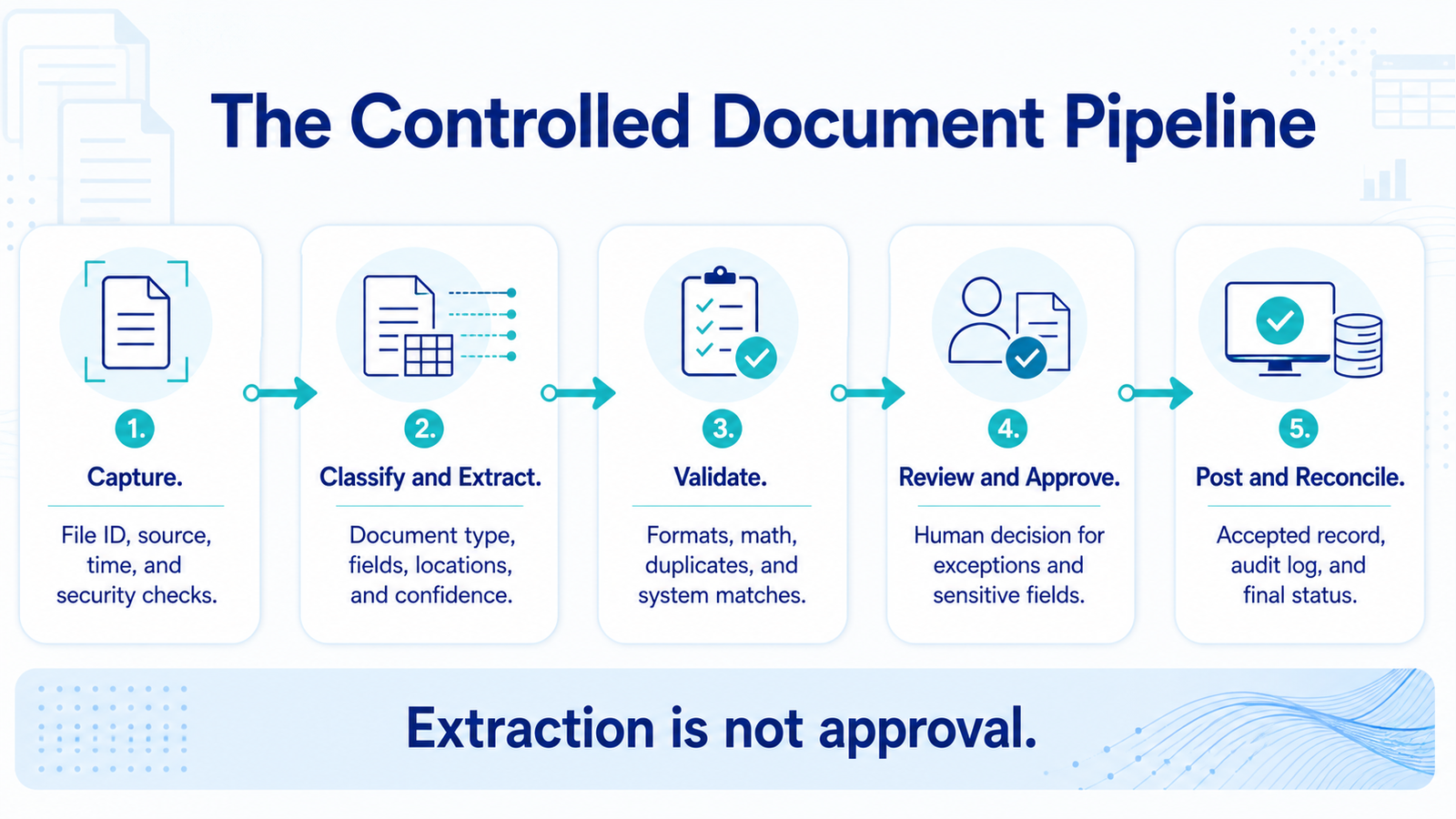
Use five separate layers:
- Capture: Receive the file, assign an immutable ID, record source and timestamp, and scan for basic file risks.
- Classify and extract: Identify document type, split files if necessary, and return fields with location and confidence metadata.
- Validate: Apply formats, math, duplicate checks, reference-data matches, and business rules.
- Review and approve: Present failed or sensitive fields to an authorized person with the source image visible.
- Post and reconcile: Write approved data to the destination, log the outcome, and verify that the target system accepted it.
Specialized services can normalize varied labels. AWS documents that its expense analysis maps terms such as bill number, invoice number, and receipt number into a standard invoice or receipt ID field. That helps extraction consistency, but the business must still verify duplicates, vendor identity, amounts, and approval state.
Step 5: Create the exception workbench
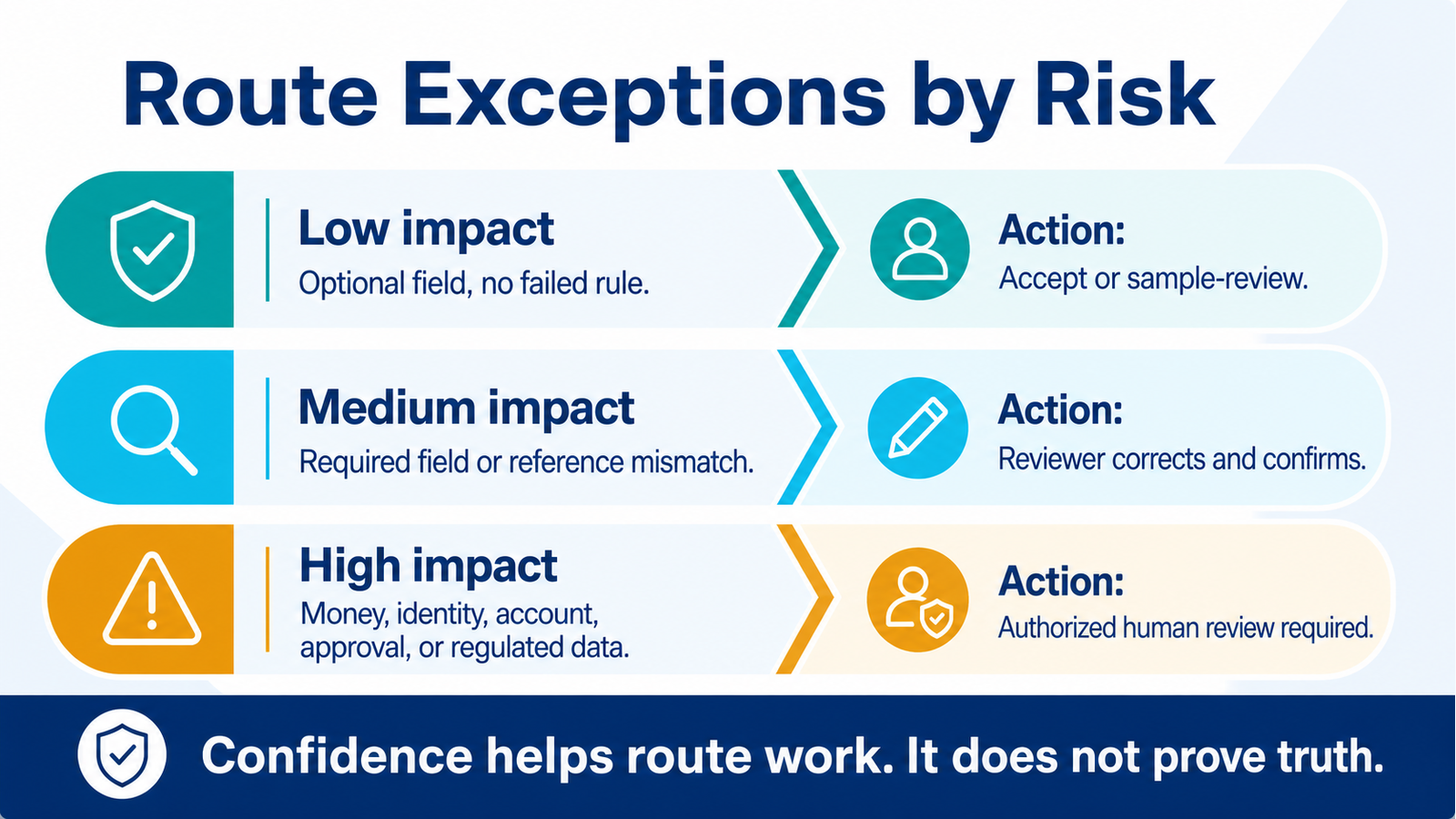
A single confidence threshold is too crude. By the end of this step, reviewers should see only the fields and cases that need judgment, ordered by risk.
For each exception, show:
- Original document region
- Extracted value
- Normalized value
- Confidence or model signal
- Failed rule
- Reference-system value
- Recommended action
- Reviewer identity and decision
Use stricter handling for account numbers, totals, identity fields, payment instructions, regulated data, and other high-impact values. A low-confidence optional note may be acceptable. A slightly uncertain bank detail should never pass automatically.
Do not let text inside a document alter system instructions or permissions. Treat document content as untrusted input. The extraction component should return data only into a defined schema, and downstream actions should be governed by validation and authorization.
Step 6: Connect the destination safely
By the end of this step, approved data should enter the business system exactly once and produce a verifiable result.
Begin with drafts or a sandbox. Use idempotency keys or duplicate controls so retries do not create repeated records. Limit service-account permissions to the required objects and actions. Store secrets outside prompts and documents. Log the document ID, extracted version, rules applied, reviewer, posted record ID, and final status.
If the destination rejects the record, keep the case open and notify the owner. The workflow should not mark the document complete because an API request was sent. Completion means the target system accepted the intended record and the result can be reconciled.
Step 7: Pilot, compare, and expand
Run the system beside the current process or on a controlled portion of volume. Compare the AI-assisted result with the verified human result. Categorize every correction by document source, field, vendor or template, extraction issue, validation gap, integration issue, or policy ambiguity.
Expand only when the current document class meets the agreed thresholds across a meaningful sample. Add one new document type or vendor group at a time. Changes in document layouts, extraction models, policies, reference systems, and integrations should trigger regression testing.
NIST's AI Risk Management Framework organizes risk work around Govern, Map, Measure, and Manage. That is a useful operational pattern here: define ownership, map the exact context, measure performance and risk, then manage changes and incidents throughout the lifecycle.
What success looks like
Track outcome quality and staff effort together:
- Percentage of documents correctly classified
- Field-level precision for required fields
- Percentage completed without human correction
- Human review minutes per document
- Duplicate and mismatch detection
- Posting success and reconciliation rate
- Exception volume by reason
- Backlog and end-to-end cycle time
- Unauthorized or high-severity errors
- Cost per correctly completed document
“Straight-through processing” should mean the entire case passed capture, extraction, validation, posting, and reconciliation. Do not count a document as automated merely because OCR ran.
Common mistakes to avoid
Starting with every document. Narrow scope produces better training data, clearer rules, and faster operational learning.
Using confidence as truth. Confidence is a routing signal. Validate critical fields against math, policy, and systems of record.
Posting before approval design is complete. Begin with drafts and review queues. Expand authority after evidence.
Hiding the source from reviewers. Place the original document region beside the extracted value to reduce correction time.
Ignoring lifecycle changes. Layouts, vendors, models, policies, and APIs change. Maintain regression sets and alerts.
Frequently asked questions
Is document processing the same as OCR?
No. OCR converts visual text into machine-readable text. Document processing adds classification, field extraction, normalization, validation, routing, human review, system integration, and reconciliation.
Can AI process invoices without templates?
Specialized services can extract common invoice fields from varied layouts, but results still need validation. Unusual documents, new vendors, poor scans, and high-impact fields require exception handling.
Should every low-confidence field go to a person?
Not necessarily. Route based on field importance, failed rules, confidence, and business risk. A missing optional note differs from an uncertain total or identity field.
Can the system approve invoices automatically?
Approval should follow company policy, authority limits, separation-of-duties rules, fraud controls, and applicable regulation. Many organizations should keep approval with authorized people even when intake and matching are automated.
What is the best first document workflow?
Choose a high-volume document with stable required fields, a clear owner, a reliable destination, and measurable correction work. Wavefront Studio can identify that candidate through a free AI readiness audit and map a controlled document-processing pilot.